5
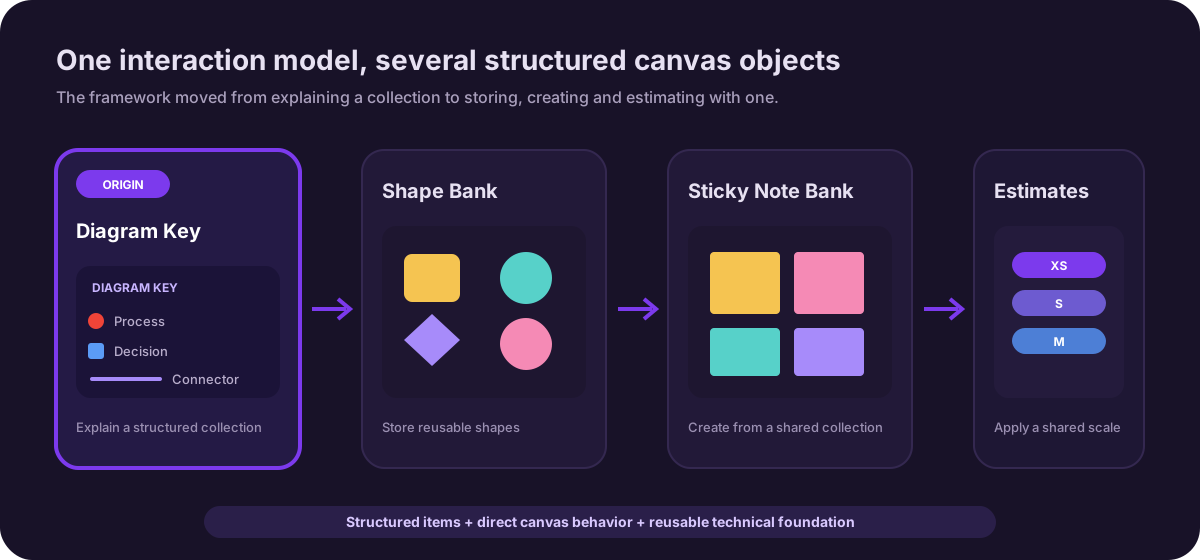
Later features built on its framework
17.6K
Peak weekly users
73%
Of users were already building legends by hand
The project in a nutshell
I began this project thinking I was designing one new shape: a legend to explain a diagram. It ended with a new class of native canvas object, and an interaction and technical framework that five later features — Shape Banks, Custom Shape Banks, Sticky Note Banks, T-shirt Sizing and Estimates — were built on, across both Lucidchart and Lucidspark. Along the way the work earned a patent and settled into steady use by roughly 13,000 people a week, years after launch.
So this case study is really about how a feature request became a platform primitive: the research that reframed the problem, the principle that kept its scope honest, and the engineering partnership that made the harder, more correct architecture the one that shipped.
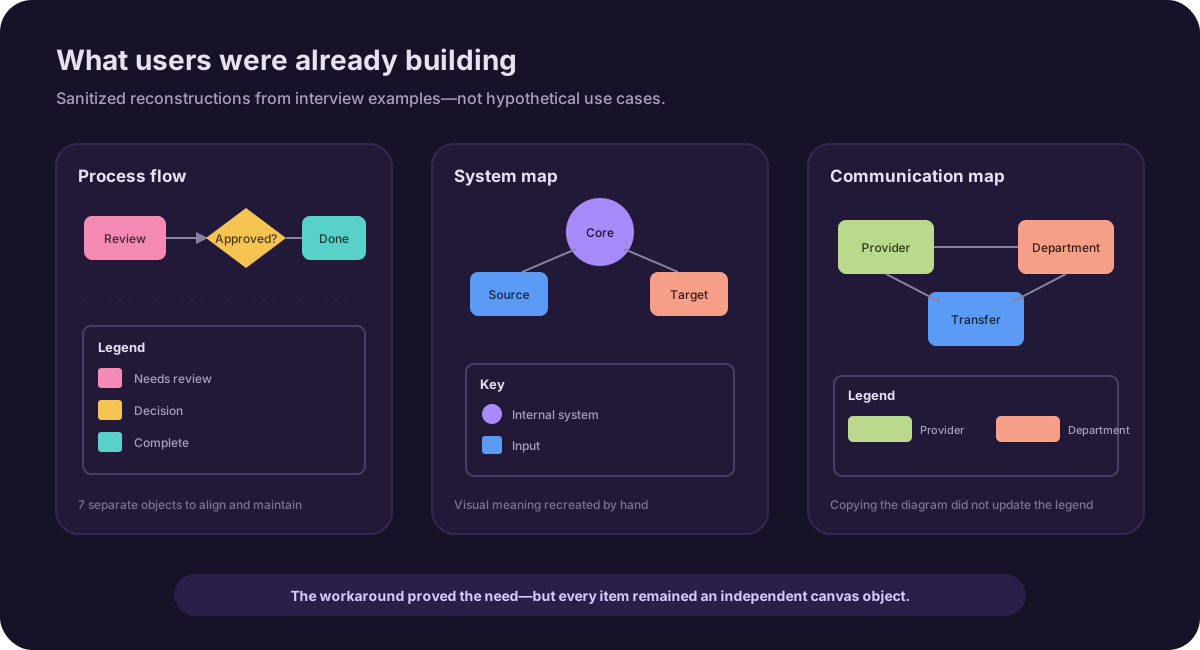
Here is where it started. Over the years, product managers and designers at Lucid had noticed a recurring pattern. Users were manually creating legends for their diagrams using basic shapes, text fields and icons.
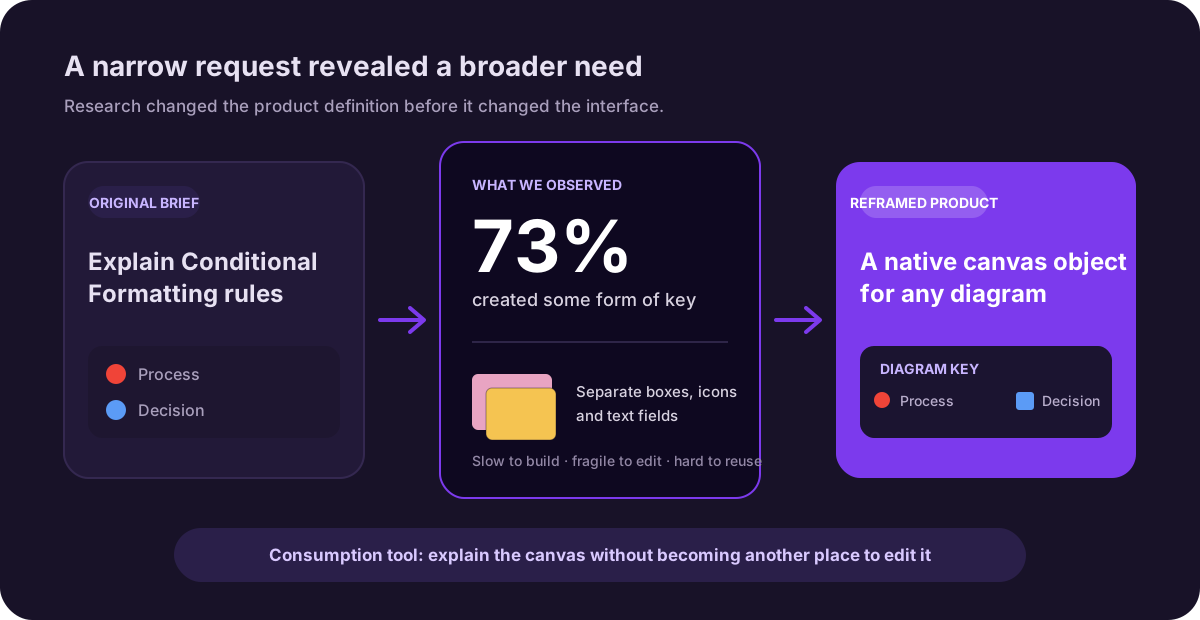
Our research later showed that 73% of users had created some form of legend. We were not trying to introduce a new behavior. We saw an opportunity to take something users were already doing, make it easier, remove some of the pain and create a more delightful experience.
The workaround worked, but creating a legend this way was slow, fragile and difficult to reuse.
“I want to be able to send a diagram to someone and not need to provide additional context. The diagram key does that.”
The project started with a simple question: could we turn this existing behavior into a native Lucidchart feature?
Role & scope
I led the interaction design and co-led research with my Product Manager over nine months. On paper, the assignment was one feature. In practice, I was defining Lucidchart's first structured, multi-part canvas object — and every decision about how it selected, resized, and edited became a default that later features inherited.
What I owned
- →Reframing the brief from "build a legend shape" to "define a new class of structured canvas object"
- →Co-leading the research program with my PM — interviews, card sorts, alpha and beta testing
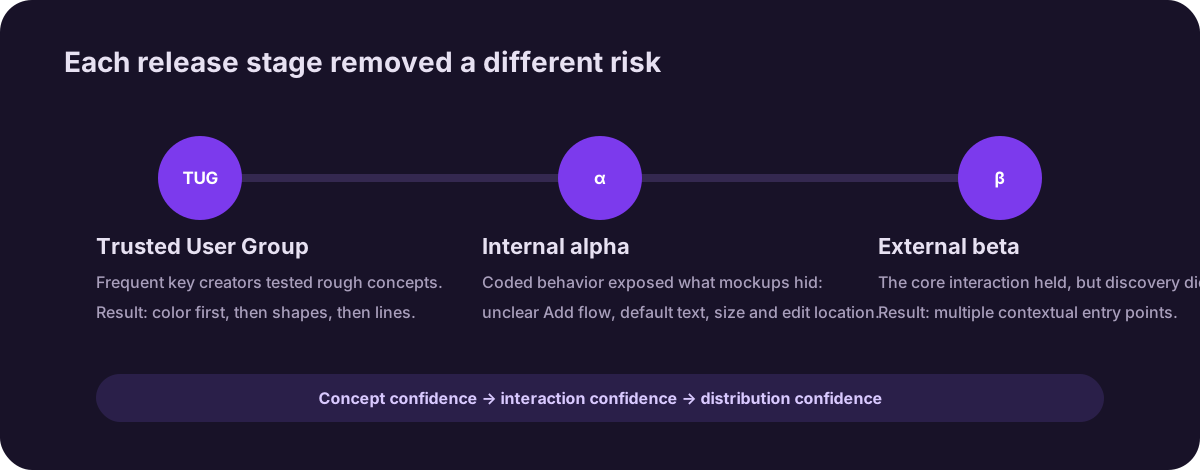
- →Standing up a Trusted User Group that outlived the project as research infrastructure
- →Defining the interaction model: on-object editing, structured resizing, native canvas behavior
- →Holding the canvas-first architecture through an engineering team change, then partnering to make it buildable
- →Shaping the roadmap through a user-value-versus-effort exercise run jointly with engineering
- →Drawing the integration boundaries — where legends belonged, and where they didn't
- →Auditing usage post-launch, including the study that ruled out our own hypothesis
Research
Understanding how people used legends
Leadership saw legends as a promising area and asked my PM and me to investigate the opportunity.
We conducted 30-minute, semi-structured interviews with Lucidchart users. We recruited through email and focused on people who had been active within the previous month — starting broad with their work, then narrowing to their legend behavior.
Testing the first prototype without leading users
Only after learning about their existing process did we show participants a simple Figma prototype. It simulated a color-based legend and supported:
- →Adding an item
- →Deleting an item
- →Reordering items
- →Editing labels
Waiting protected the research from our solution. We wanted people to describe their real behavior before our prototype gave them a new vocabulary for it.
We started with color because it was the most straightforward version to build. We also asked what else belonged in a legend: shapes, line styles, object sizes or Conditional Formatting rules.
Key, or legend?
One thing we kept circling back to was what to even call it. In almost every interview we asked what “key” meant to them, and then what “legend” meant, and people did not really agree. Some used the two words interchangeably, some had a firm idea of one and not the other.
That is partly why the feature shipped as Diagram Keys while I still say “legend” through most of this write-up. We never fully settled the naming, and I would rather leave that as an honest loose end than pretend we resolved it.
What we learned
People were already doing the work manually
Users were assembling legends from basic shapes and text. It worked, but it was slow, tedious and hard to reuse. The need already existed; we needed to make a familiar workflow easier rather than persuade people to adopt a new one.
When we put early mocks in front of people, the reaction was blunt. One business process analyst said employees “don’t know the notations,” so a key “would help a lot.” We were not selling them on a need. They already had it, and were doing it by hand.
A legend is primarily a consumption tool
People used legends to help someone else understand a diagram. The reader might not know why certain colors, shapes or lines were being used. The legend’s primary purpose was comprehension.
A few people pushed this further and asked for view-only collaborators to see what was powering a shape, not just the shape itself. That stuck with me. The person reading the diagram is usually not the person who built it, and they are who the legend is really for.
A legend is not a second creation tool
I explored selecting a color in the legend to highlight corresponding objects on the canvas. Exact matching was unreliable—two colors could look identical while using different hex values—and users did not see the legend as another place to configure their diagram.
They wanted it to explain the canvas, not become a second interface for controlling it.
What is interesting is that people kept reaching for that second interface anyway. In testing, several users clicked a key item and tried to make it select or recolor the matching shapes, or right-clicked expecting a “link these” option. The instinct was real, which is why we kept exploring it. The same sessions showed why it was risky though. “To the user, nothing is obvious,” and the color matching could quietly break. With Conditional Formatting the question got sharper. Was the legend there to help someone understand the changes on a diagram, or to power those changes? We decided it was the first, and that kept the scope honest for the rest of the project.
Users wanted the experience on the canvas
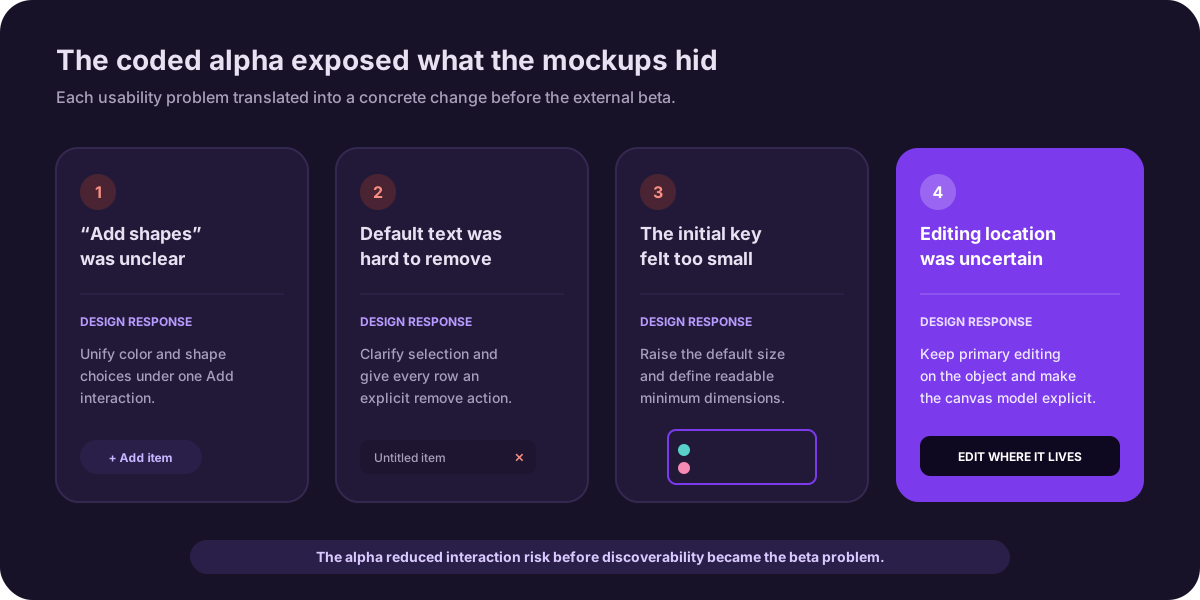
My original proposal kept the legend and its interactions directly on the canvas. Engineering suggested moving configuration into the right panel because it would be easier to build. Research validated the canvas-first direction: users expected to edit the legend where it lived and wanted it to behave like a native shape.
It was not unanimous, and that is worth saying. One director of project management wanted her charts “as simple as possible” and would rather change things from the panel than on the shape. So canvas-first was not a clean win in the research. It was the stronger signal across most people, especially the ones who built legends often, and we made a call.
People say one thing and do another
When we asked customers whether they valued automation or customization, almost everyone said automation. Save me the manual work. But watching the same people use the prototypes, a lot of them wanted to pick through what got added and keep control of it. So we stopped taking the stated preference at face value and designed for the gap: generate a strong starting point automatically, then let people prune it down.
In their words
What users actually told us
These are pulled straight from interview notes. I’ve kept them to roles rather than names, since this was research, but the words are theirs. A few of them ended up shaping decisions more than any deck did.
“Employees don’t know the notations. A key would help a lot.”
“I want everything all at once. I don’t want to go to different places to add lines or shapes.”
“I want my charts as simple as possible. I’d rather change things from the panel than on the shape.”
“If it’s smart, it would be quicker to generate something than to build it manually.”
“Let view-only people see what’s powering a shape, not just the shape.”
Building a Trusted User Group
When interview participants had created a legend before, we asked them to show us their work and invited them to join a Trusted User Group. This kept us connected with people who had firsthand experience instead of starting with a new group for every prototype.
The model outlasted the feature. Trusted user groups became part of how our team validated later canvas work — including the org charts redesign — because this project showed that a standing panel of invested users beats recruiting from scratch every time you have something to test.
Prioritizing the roadmap
We ran a card-sorting exercise with the Trusted User Group to understand what people most wanted to include. The ranking was clear:
- 01 Colors
- 02 Shapes
- 03 Line styles
- 04 Conditional Formatting rules
The result gave us a user-backed roadmap and a better business conversation. Although Conditional Formatting was part of the original opportunity, users placed it behind colors, shapes and lines. We built around their priorities.
We also plotted everything on a simple user-value-versus-effort grid with engineering, so the roadmap conversation was not just “what do users want” but “what is worth building first.” And the split between our internal Lucid users and external customers was real. Internal folks reached for things like Conditional Formatting faster; external customers cared more about the basics being solid. When the two diverged, we followed the external signal.
Translating the research into design
Starting with color
We began with the smallest useful version: a color-based legend that people could edit directly on the canvas. They could add a color, label it, reorder or remove entries, then resize and move the complete object.
Starting with color let us validate the core interaction before adding more complexity.
Holding the line on canvas-first editing
This was the biggest architecture decision in the project, and the cheaper version of it would have won by default. Moving editing into the right panel was technically more feasible, and for a while it was the likely direction. But it separated the object from the controls needed to use it — and it would have quietly taught users that this object was second-class: on the canvas, but not of it. Internal feedback reinforced what the research showed: it was not intuitive enough.
The direction survived an engineering team change because I kept making the case for it. When the new team came on, I partnered with an engineer who also believed canvas-first was right, and we worked through the canvas limitations together until the original proposal was buildable. The result was harder to build and easier to understand — and because every later feature built on this framework inherited that trade, it was worth making once, correctly.
Adding shapes
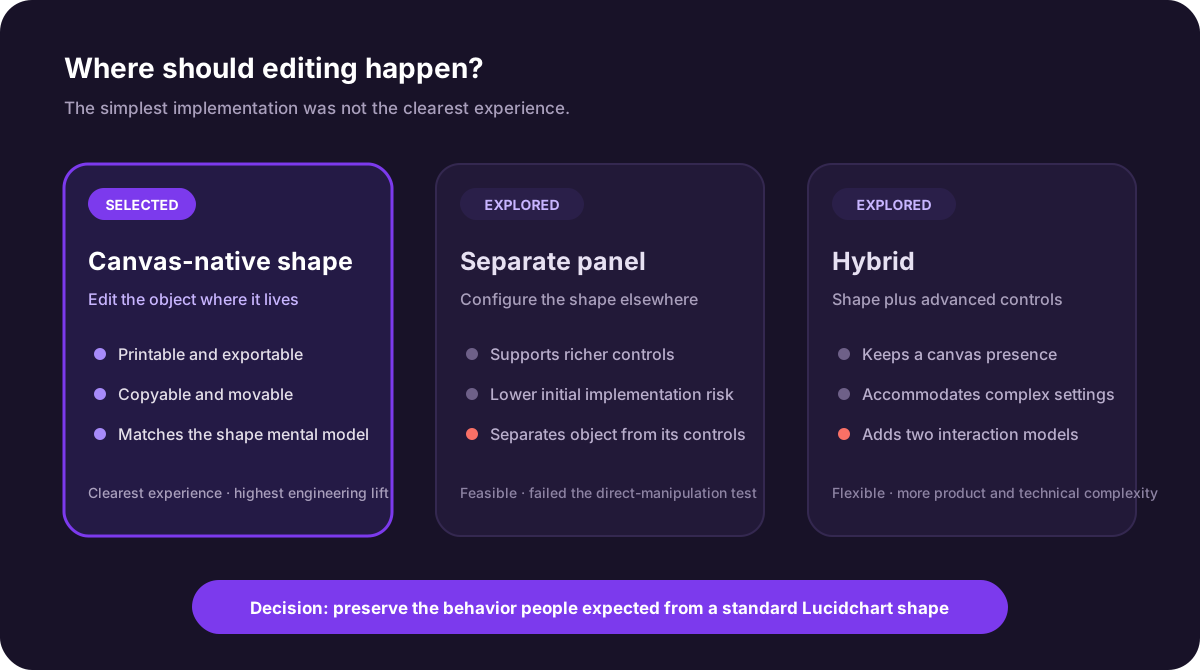
Once the color interaction was established, I extended the same Add control to support both colors and shapes. Users could choose a styled shape already present in the document or drag a new shape directly into the legend.
That made the feature more versatile, but exposed another problem: large legends still required repetitive, row-by-row work.
Generating a legend from Shapes in Use
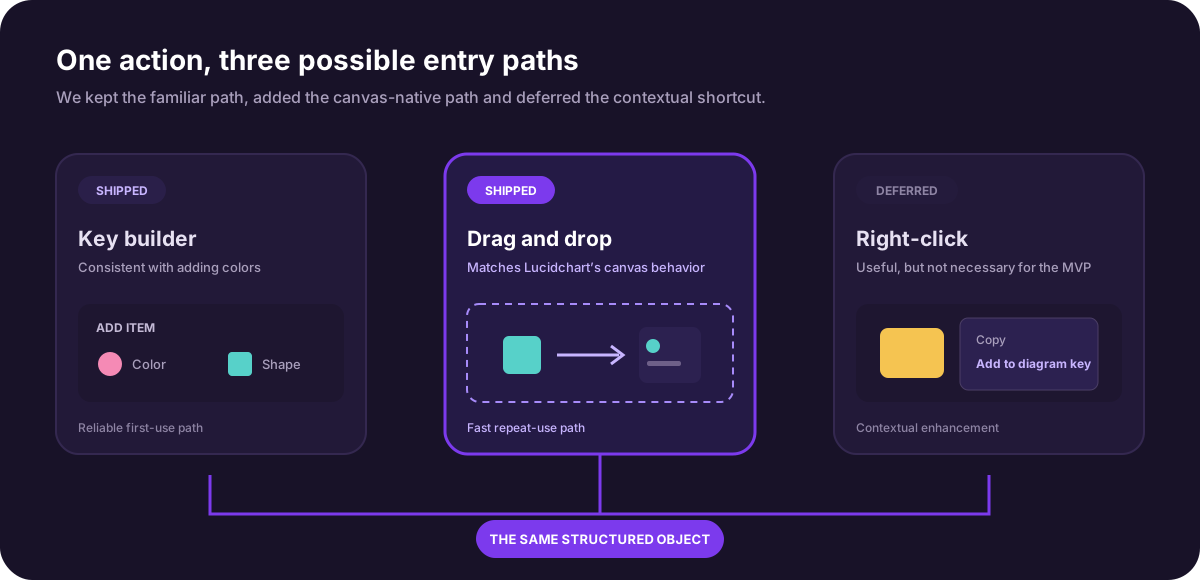
Lucidchart already had a feature called Shapes in Use. It surfaced the shapes in a document and retained styling such as fill and border, giving us the exact information needed to build a shape-based legend automatically.
We added a call to action inside Shapes in Use. In one action, people could generate a useful starting point from the styled shapes already present instead of rebuilding it one row at a time.
The work contributed to a patent for automatically generating legends from graphical objects.
Making a complex object resize correctly
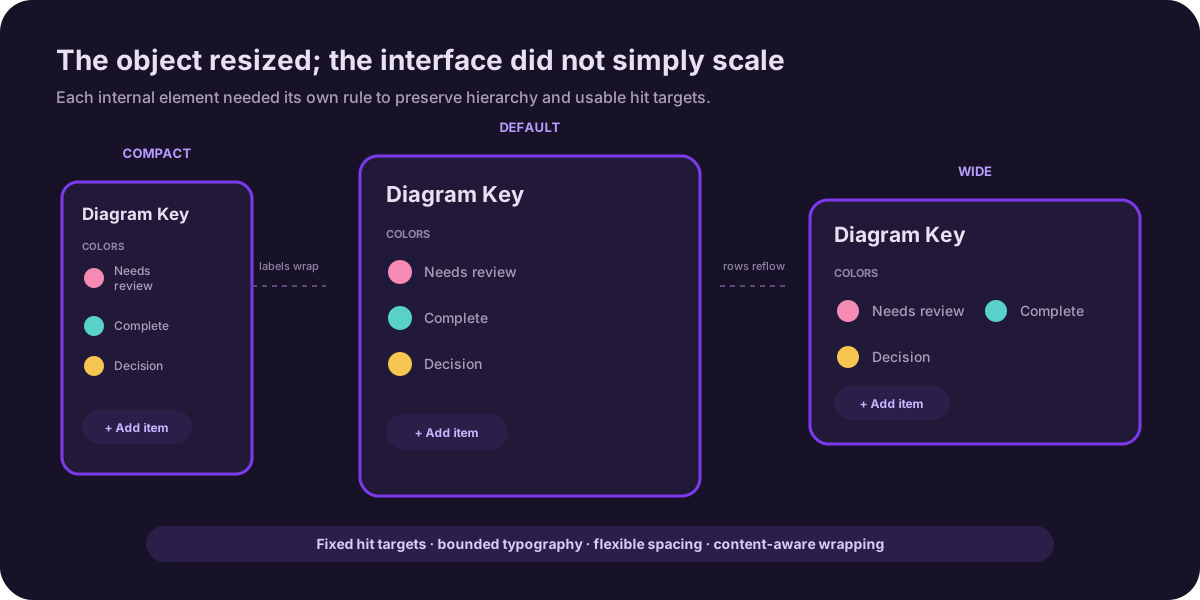
A standard Lucidchart shape usually contained one block of text. A legend contained a heading, multiple rows, a visual value and label in each row, plus an Add control. Those elements could not all resize in the same way.
Lucidchart’s existing text-scaling behavior had not been designed for this much internal structure. The engineer and I iterated on spacing, wrapping, minimum sizes and scaling until the legend remained readable at different sizes.
It looked simple in a static mockup and became much more complicated once it had to behave on a real canvas.
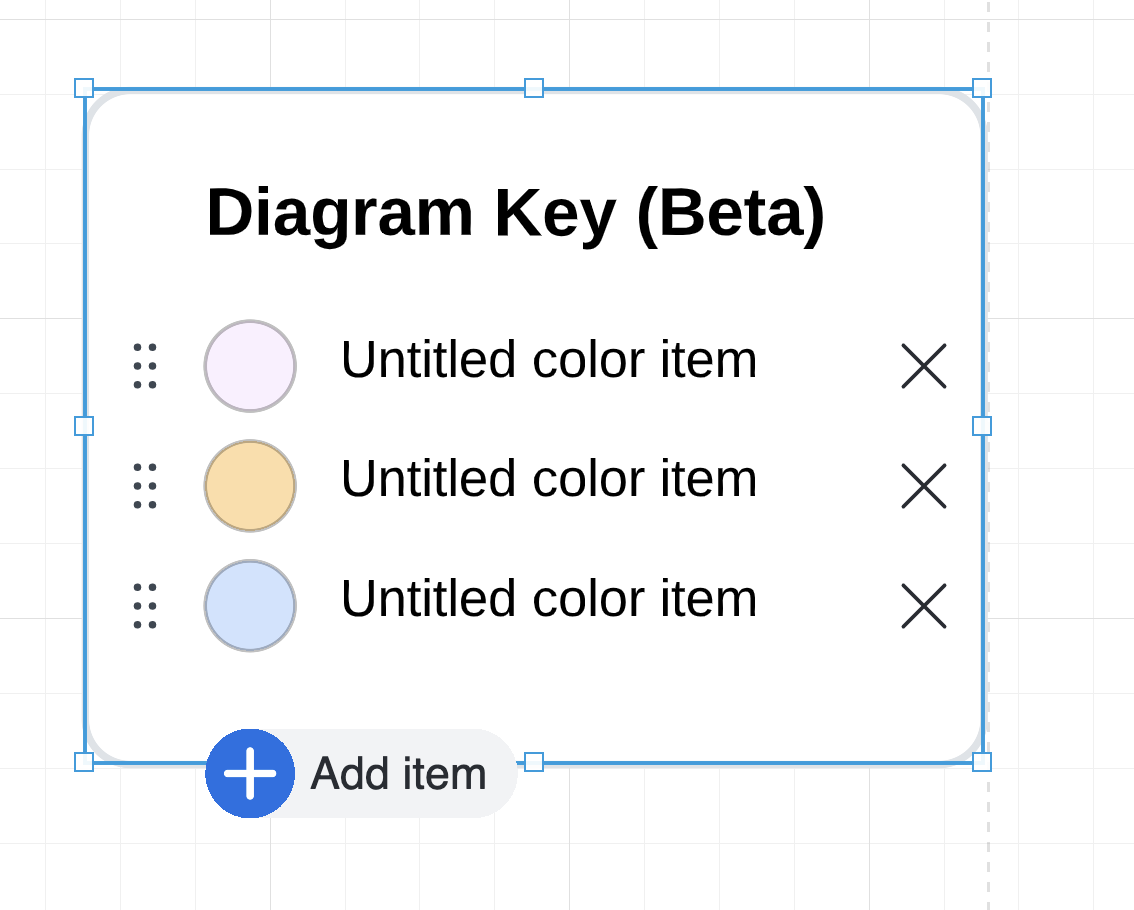
Color MVP
Validate adding, labeling, reordering and removing entries directly on the object.
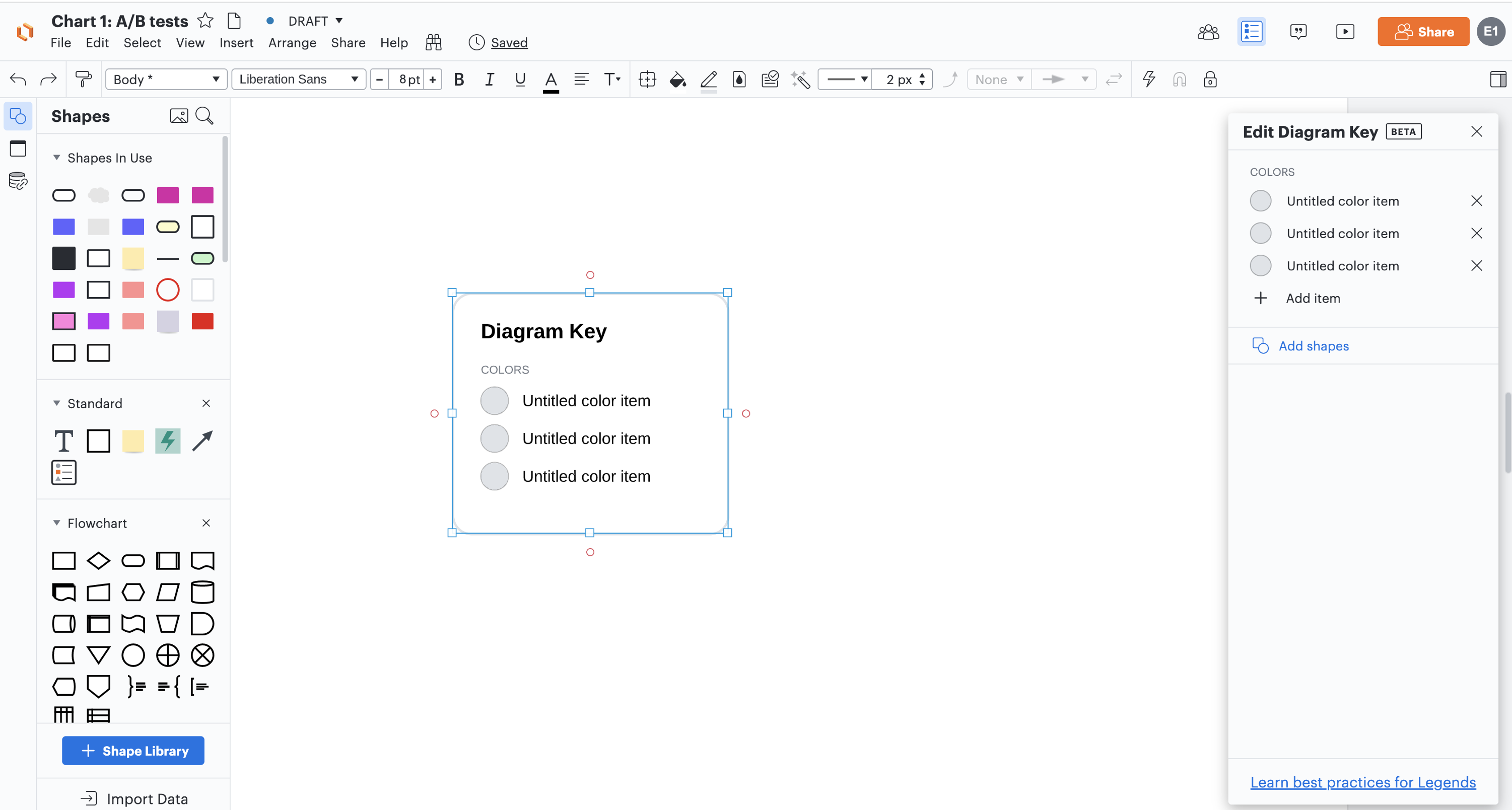
Panel exploration
Test a lower-cost implementation—and learn why separating the controls felt wrong.
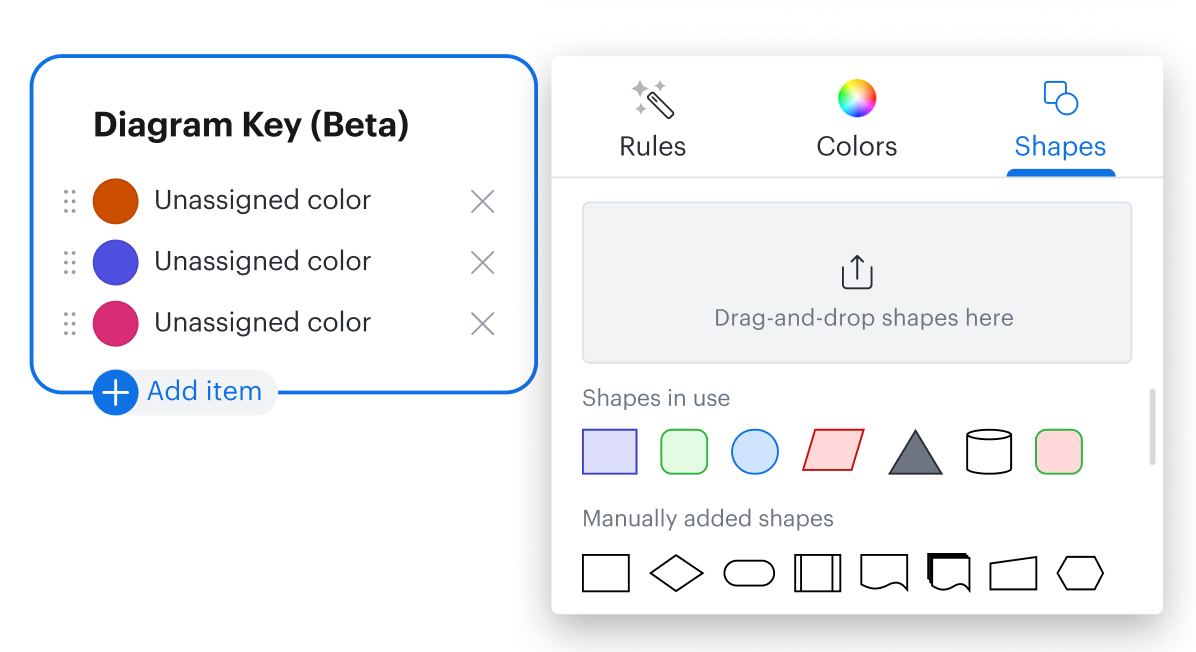
Shapes
Extend the same interaction to styled shapes already present in the document.
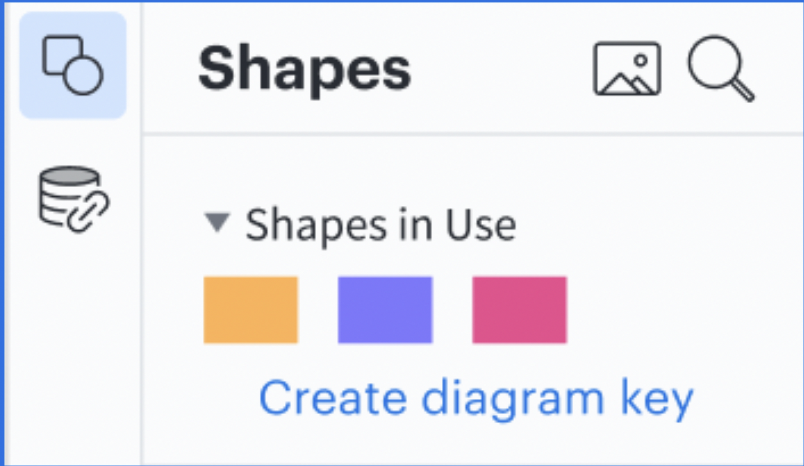
Automatic generation
Generate a useful starting point from Shapes in Use rather than rebuilding it row by row.
The shipped interaction
A legend that behaves like a shape
People drag the legend from the Standard Shapes library, place it on the canvas and move or copy it like any other Lucidchart object.
Direct item editing
Adding, labeling, reordering and removing entries happens on the object rather than in a disconnected settings panel.
Structured resizing
The heading, labels, values and controls follow different resizing rules so the legend remains readable at multiple sizes.
Native canvas movement
The legend remains printable, exportable and easy to position beside the part of a large diagram it explains.
Helping users find the feature
We wanted the legend to feel like a fundamental diagramming tool rather than a specialized feature hidden inside a menu. We placed it in the Standard Shapes library, available in every document.
Its location communicated that:
- →A legend could be useful to any user
- →It behaved like another shape
- →People could position it anywhere on the canvas
Beta testing showed that Standard Shapes was not enough. Keys were sitting in the Standard Library on every single document and people still walked right past them. So we explored additional entry points through search, Feature Find, the Insert menu, Shapes in Use and relevant templates.
The goal was not to place the feature everywhere. We wanted it to appear where people were already likely to need it.
Standard Shapes
Search
Feature Find
Insert menu
Shapes in Use
Integrating legends with the rest of Lucidchart
There was an initial push to connect the feature with many projects under development. My PM and I looked instead for places where a legend had a natural relationship with the surrounding workflow.
Templates
Explain a real use case
Templates already contained structured content. A legend could explain their visual conventions while introducing the feature in context. We mapped a rollout across 93 English templates.
Conditional Formatting
One integration, not the definition
I explored generating a legend while someone created formatting rules. The connection made sense, but it was one way to use a legend rather than the reason every legend existed.
The principle that scoped the project
A key is for reading a document, not changing it.
We wrote this down partway through the project, and it settled every scope debate that followed: which explorations stayed concepts, how deep the Conditional Formatting integration went, and why the legend never became a second control surface for the canvas.
Concepts we explored but did not ship
These ideas reveal the broader system we considered, while keeping a clear boundary between concepts and the work that reached production.
The framework outlived the feature
The outcome I value most is not the legend — it is what the legend made possible. The interaction model and technical framework built for Diagram Keys became the foundation for five later structured canvas objects: Shape Banks, Custom Shape Banks, Sticky Note Banks, T-shirt Sizing and Estimates, across both Lucidchart and Lucidspark.
That reuse was possible because the hardest problems were solved once, at the object level rather than the feature level: how a multi-part object lives natively on the canvas, how its parts follow different resizing rules without breaking, how people edit it in place, and how it can be generated from content already in the document. The teams building those later features inherited answers instead of re-deriving them.
I was not on those teams. They picked the framework up and built with it on their own — which is the test I hold platform work to: a pattern becomes infrastructure when teams you never worked with can build on it without you in the room. By that measure, this project shipped one feature and seeded five more.
Usage and adoption
Diagram Keys launched in 2021. The available weekly dataset begins in May 2022 and records broad, actively promoted usage beginning in late September 2022.
Across 148 weeks with recorded activity through May 2025, roughly 12,900 distinct users worked with keys every week, peaking at about 17,600. Event volume tells the same story as supporting color: around 159,000 weekly interaction events on average, peaking near 238,000.
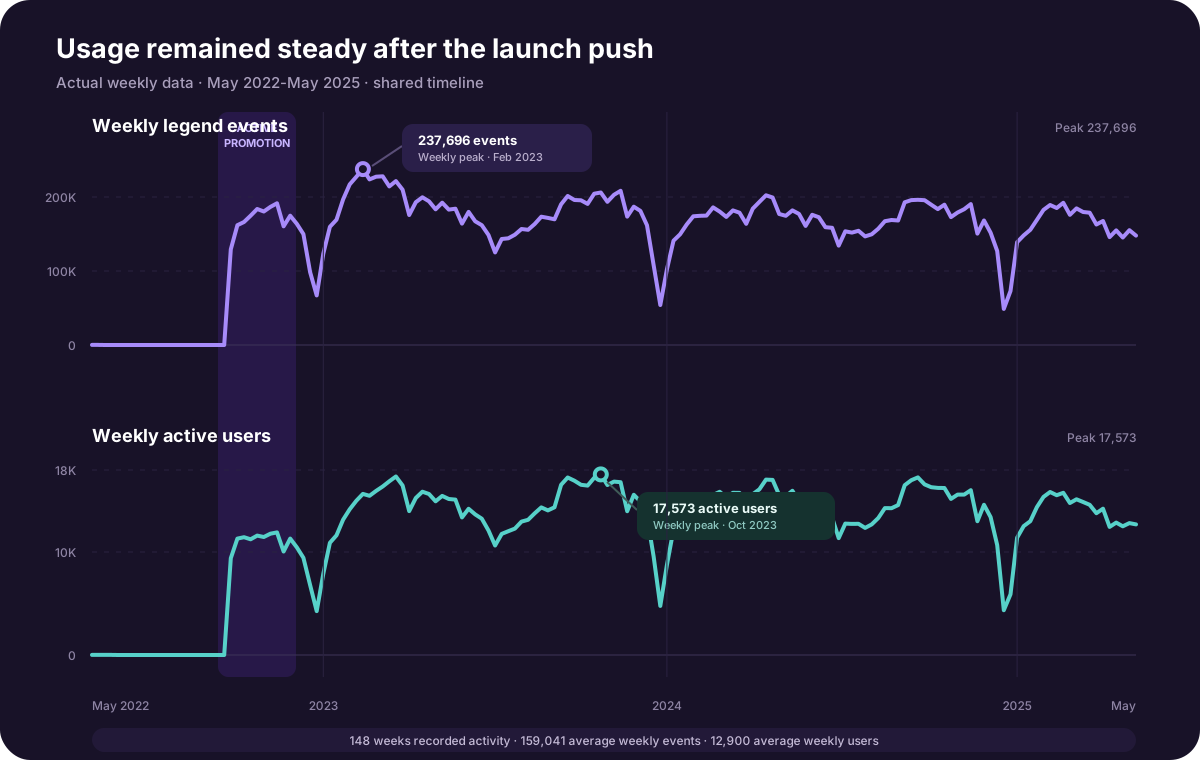
We actively promoted the feature around launch, but usage remained consistent long after that initial push. To me, that sustained behavior is a stronger signal than the launch spike: the feature continued to solve a real need after people discovered it.
What the aggregate metrics did not explain
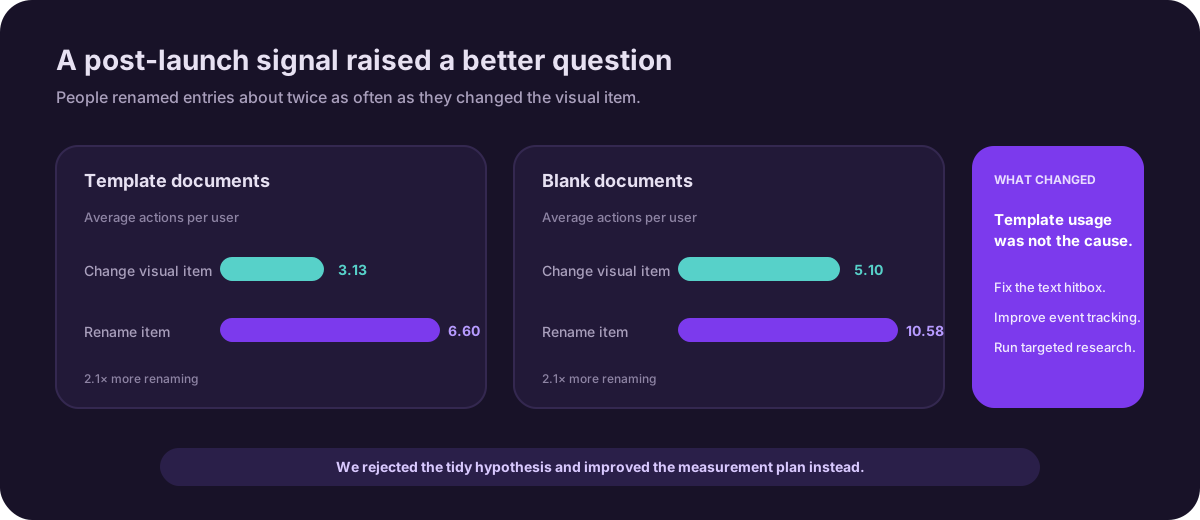
Sustained usage told us the feature mattered, but it did not explain a recurring behavior: people renamed items far more often than they changed their visual values. We wondered whether prefilled template legends were causing the gap.
A post-launch document audit did not support that hypothesis. The rename-to-change ratio was essentially the same in template and blank documents. That changed the next step from “fix the templates” to improving the text hit area, tightening event tracking and returning to qualitative research to understand the behavior.
What I took away from the project
This project started with a behavior users had already created for themselves. They wanted their diagrams to communicate clearly and were doing a lot of manual work to make that possible.
Research helped us separate the underlying need from the solutions people initially requested. That distinction shaped the most important decisions we made:
- →Prioritizing colors and shapes
- →Keeping interactions directly on the canvas
- →Treating the legend as a consumption tool
- →Generating it from content already in the document
- →Integrating it only where the surrounding workflow made sense
Not every idea reached production. The core experience did, and people continued using it years after launch.
If I did this again, I would set those principles earlier. We landed on “a key is for reading a document, not changing it” partway through, almost as a north star after the fact, and a lot of the back-and-forth in the first few months would have been shorter if we had written it down on day one.
The reframe is what stays with me: we were never building a legend, we were defining a class of object. That is now the first question I bring to any new canvas feature — are we building a feature, or a primitive other teams will stand on? Getting that answer right early is worth more than any single interaction decision that follows.